SaaS Security: How to Protect Your Cloud Apps and Data




Key takeaways
 SaaS security protects applications, data, and access points through authentication, encryption, configuration controls, and continuous monitoring.
 Security in SaaS follows a shared responsibility model. The provider secures the platform while your organization is responsible for security configuration, identity access, and data.
 Misconfigurations, unvetted applications, hijacked credentials, and excessive OAuth permissions represent the primary drivers of SaaS incidents.
 Establishing complete visibility across both sanctioned and unsanctioned SaaS apps is the foundation of effective SaaS security.
 In addition to broad visibility, closing the shared responsibility gap requires strong identity controls and reliable data recovery
What is SaaS security?
SaaS security encompasses the daily policies, technical controls, and monitoring required to defend cloud-based applications and the sensitive data moving through them. If your business operates on software as a service platforms like Microsoft 365, Google Workspace, or Salesforce, protecting that environment falls squarely on your IT and security leaders.
Building an effective defense demands active management of the identities and configurations running across every tool your organization relies on. It is easy to fall into the trap of assuming a major vendor secures everything automatically. While providers maintain physical systems and platform uptime, leaving user access unmonitored creates immediate exposure to modern cyber threats. Understanding where that vendor boundary ends is essential to building an operational strategy that keeps corporate assets safe.
Definition and meaning
SaaS security is the practice of protecting SaaS applications, their underlying data, and the identities accessing them through strong authentication, encryption, access management, configuration management, and real-time monitoring.
Security in cloud platforms operates as a shared effort between the subscriber and the software provider rather than a provider-only service. Vendors ensure the cloud based infrastructure stays online and resilient against physical threats. Subscribers remain entirely responsible for controlling user permissions, enforcing data protection policies, securing active sessions, and preventing unauthorized external access.
Why is SaaS security important?
Rapid cloud adoption has made SaaS applications the primary operating environment for modern enterprises, with Gartner estimating global spending at $299 billion in 2025. As organizations migrate core operational workflows into cloud-based platforms, these tools become business-critical repositories for customer data, proprietary code, and financial records. Consequently, every new application, integration, and user account quietly expands your overall attack surface.
IBM reports that the global average cost of a data breach stands at $4.44 million with incidents originating in cloud environments driving substantial detection and escalation expenses. Regulatory compliance standards also hold companies legally accountable for safeguarding this data, regardless of where it is hosted. Because modern business runs on cloud applications, securing those platforms is a foundational requirement for organizational resilience.
Yet, customer-side operational gaps drive most SaaS security incidents. For example, CSA's 2025 State of SaaS Security Report found that 56% of organizations say their employees upload sensitive data to unauthorized SaaS apps, often without sufficient visibility or enforcement. Attack surface, compliance exposure and cloud adoption speed all point in the same direction: business-critical data now lives outside the traditional network perimeter, and the controls protecting it need to catch up.
The shared responsibility model, explained
Consider a marketing team that connects a third-party analytics app to Google Workspace or Salesforce, granting it broad OAuth permissions to read and modify account data. Months later, attackers compromise that external app and use its existing access rights to quietly pull confidential records directly out of the CRM.
The SaaS provider's underlying physical infrastructure, servers, and baseline application code remained completely secure throughout the entire event. The exposure happened because the subscriber allowed an over-privileged integration to bypass administrative oversight, illustrating that while the provider owns platform security, configuration, identity, and access rest firmly on the customer.
What are the most common SaaS security risks and challenges?
Most SaaS incidents trace back to a few recurring gaps. Understanding each one gives your team a clear starting point for closing them.
6 core SaaS security risks
- Misconfiguration
Security settings frequently drift from their target baseline over time, leaving multi-factor authentication disabled or file sharing open to the public. According to findings from the CSA, 65% of organizations struggle to fix these configuration gaps, making misconfigurations the single most common entry point for unauthorized access. - Shadow SaaS and shadow IT
Unsanctioned apps that IT never approved and cannot see create a blind spot that grows every time an employee signs up for a new tool with a work email. According to CSA research, 55% of security teams report employees adopting SaaS applications without IT involvement. - Account takeover (ATO)
Stolen credentials, phished logins, and hijacked active sessions allow attackers to walk through the front door using legitimate user identities. Once inside an authenticated session, malicious actors can move laterally across connected cloud services without raising immediate infrastructure alerts. - Over-privileged and dormant accounts
User permissions tend to accumulate over time, leaving current employees with access rights far beyond what their roles require. When employees leave an organization, these unused "zombie" accounts often remain active, creating high-value, unmonitored entry points for attackers. - Risky SaaS-to-SaaS integrations
Modern cloud platforms thrive on connectivity, but third-party OAuth integrations often grant external applications broad permission to read, store, and modify corporate data. CSA's 2025 research found that 73% of security teams struggle to maintain visibility over these app-to-app connections. - Data loss and unrecoverable data
Accidental file deletions, malicious insider actions, uncoordinated offboarding, and ransomware attacks can permanently destroy critical operational data. While SaaS vendors guarantee physical platform uptime, they do not restore lost customer-side data, leaving organizations entirely responsible for implementing reliable recovery mechanisms to maintain business continuity.
What are the benefits of a strong SaaS security posture?
Maintaining a mature security posture across your cloud footprint mitigates risk and transforms how your security team oversees daily operations. Establishing active controls across all cloud-based tools delivers measurable benefits:
- Complete visibility across sanctioned and shadow applications
Full visibility across all sanctioned and unmanaged tools eliminates blind spots and enables IT teams to enforce consistent policies across both corporate-approved platforms and shadow software. - Reduced breach exposure
Enforcing strict configuration baselines, mandatory multi-factor authentication, and least-privilege access drastically shrinks your overall attack surface, shutting down the common pathways attackers use to gain entry. - Streamlined regulatory compliance
Automated control tracking systems produce continuous audit trails and provide verifiable proof of compliance with frameworks like GDPR, HIPAA, SOC 2, and ISO 27001. - Greater operational efficiency
Centralized monitoring and automated remediation tools eliminate manual account audits, allowing security teams to focus on strategic priorities instead of routine maintenance.
How does SaaS security work?
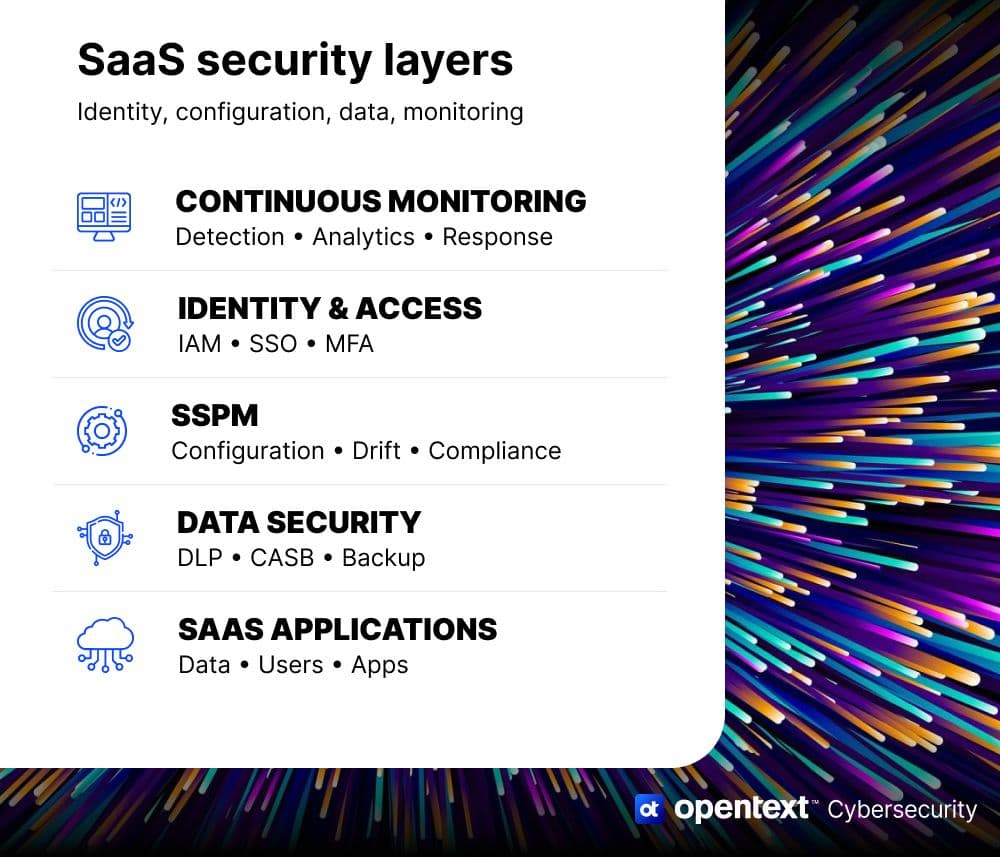
SaaS security operates as an interconnected defense model that protects identity, manages configurations, governs third-party integrations, and ensures rapid data recovery. Rather than relying on a static perimeter, modern cloud defense applies Zero Trust principles directly to user identities, active sessions, and application settings.
Protecting these environments requires continuous oversight, drawing on identity and access management (IAM) platforms to verify users, cloud access security brokers (CASB) to enforce policy boundaries, and specialized SaaS security posture management (SSPM) tools to detect drift across administrative settings.
The core components of SaaS security
- Identity and access management (IAM) systems centralize user authentication using single sign-on (SSO), multi-factor authentication (MFA), and granular role-based permissions to ensure only verified users access corporate applications.
- SaaS security posture management (SSPM) tools continuously evaluate administrative settings across connected applications, alerting security teams instantly when configurations drift from established security baselines.
- Cloud access security brokers (CASB) enforce security policies between cloud consumers and service providers, giving administrators visibility into app usage and applying data loss prevention rules across file transfers.
- OAuth app governance mechanisms inventory third-party integrations, revoking excessive permissions before unvetted app-to-app connections can quietly access or export sensitive corporate records.
- Continuous monitoring engines analyze user activity logs in real time, detecting anomalous behavior, flagging compromised credentials, and triggering immediate automated responses to contain active threats.
SaaS challenge-to-risk-to-control mapping
The table below maps each common SaaS challenge to its resulting risk and the control that addresses it. OpenText's data-protection and backup capability sits on the data loss row; the remaining rows reflect posture controls that fall outside OpenText's product scope but remain essential to a complete SaaS security program.
| SaaS Challenge | Resulting Risk | Recommended Control | OpenText Capability |
|---|---|---|---|
| Misconfiguration | Data exposure, breaches | SSPM, config baselines | OpenText CloudAlly SaaS Backup |
| Shadow SaaS | Ungoverned data, no visibility | Discovery, CASB | OpenText CloudAlly SaaS Backup |
| Weak access control | Account takeover | IAM, MFA, least privilege | OpenText Secure Cloud |
| Risky SaaS-to-SaaS / OAuth | Third-party data leakage | OAuth review, integration governance | OpenText CloudAlly SaaS Backup |
| Data loss / deletion | Unrecoverable business data | Backup & recovery | OpenText CloudAlly SaaS Backup |
SaaS security best practices
Establishing a resilient SaaS security strategy requires going beyond baseline vendor defaults to actively manage access, configurations, and third-party risk. Applying structured best practices across your cloud software estate ensures that critical corporate data remains protected against modern threats.
1. Centralize identity and enforce MFA
Connecting every SaaS application to a central IAM and single sign-on (SSO) provider gives security teams uniform control over corporate access. This centralized setup enables you to enforce mandatory multi-factor authentication (MFA) across all accounts, which directly blocks stolen credentials from granting access to your enterprise networks.
2. Apply least-privilege access and remove dormant accounts
Limiting user permissions ensures employees only access the specific tools and data necessary for their roles. Of course, roles evolve and accounts age out over time, so it's important to conduct routine permission reviews. Establishing automated offboarding workflows immediately revokes access for inactive or departed users, which closes down unmonitored entry points before attackers can find them.
3. Continuously monitor your SaaS configurations
Security settings inside cloud platforms shift constantly as administrators adjust daily workflows. Watching these settings continuously helps catch configuration drifts the moment they occur, such as public file links or turned-off security controls. A dedicated SaaS security posture management (SSPM) solution can handle this continuous oversight rather than trying to manually maintain slow, periodic audits.
4. Discover and govern shadow SaaS and integrations
Unsanctioned applications adopted without approval, also called shadow IT, create security blind spots across the organization. Running regular environment scans uncovers these hidden applications along with any connected third-party plugins. Evaluating third-party OAuth permissions enables you to revoke access for stale or high-risk integrations, which secures the background pathways into corporate data.
5. Assess vendors and map to compliance
Evaluating third-party risk begins during the vendor procurement process long before data enters a new platform. Requesting third-party audit reports like SOC 2 attestations and ISO 27001 certifications verifies that the software provider maintains rigorous physical and digital controls. This vetting process ensures that any app handling regulated data aligns with broader regulatory frameworks such as GDPR and HIPAA.
6. Protect and recover your SaaS data
Securing cloud operations ultimately requires a safety net for the data created inside these platforms every day. Implementing independent, automated backups ensures that your organization retains full ownership of its records. When accidental deletions, insider threats, or ransomware incidents wipe out operational files, an external recovery system restores those assets and keeps business operations moving.
How does OpenText Cybersecurity help protect your SaaS data?
OpenText CloudAlly Backup comprehensively protects your SaaS data with automated AWS S3 backup and unlimited recovery from any point in time.
Here are specific ways it secures your data:
- Automatically backing up data across Microsoft 365, Google Workspace, Salesforce, Box, and Dropbox from a single platform.
- Protecting business-critical information from accidental deletion, ransomware, malware, insider threats, and service outages.
- Creating immutable backups to help ensure data remains recoverable after a cyberattack.
- Enabling fast, point-in-time recovery of emails, files, Teams conversations, SharePoint content, and other SaaS data.
- Securing backup data with AES 256-bit encryption and strong access controls, including MFA and SSO.
- Supporting compliance and governance requirements with long-term retention, audit logs, and secure storage options.
- Providing flexible storage choices, including OpenText-managed cloud storage or customer-owned cloud environments.
- Simplifying backup management and recovery with a user-friendly interface and self-service restore capabilities.
Ready to secure your SaaS estate?
You can start strengthening your SaaS defenses today with three low-friction steps:
- Try the interactive product tour. See how SaaS data protection works for Microsoft 365, Google Workspace, and Salesforce. No commitment required.
- Download "7 reasons every business needs SaaS backup". Learn what is really at risk when you rely on your SaaS provider alone.
- Contact us. Get in touch today to see how OpenText Cybersecurity can help you maintain continuous application visibility, enforce configuration baselines, and protect critical SaaS data.
FAQ

Brette Petersen
Brette Petersen is a Senior Product Marketing Manager at OpenText Cybersecurity, focused on messaging and positioning for ransomware prevention and detection solutions. She brings more than eight years of product marketing experience, including a tenure at Proofpoint leading email security marketing for a $700M+ SaaS platform. Brette holds an MBA in Marketing Analytics and Management from the University of Utah's David Eccles School of Business and is certified through the Product Marketing Alliance and Pragmatic Institute. She is committed to helping customers cut through complexity with clear, credible product storytelling.