What is SaaS backup? A guide on how to choose a solution



Key takeaways
 SaaS backup creates independent, recoverable copies of the data in your cloud applications, separate from what a provider stores.
 SaaS backup is sometimes called cloud-to-cloud backup (C2C).
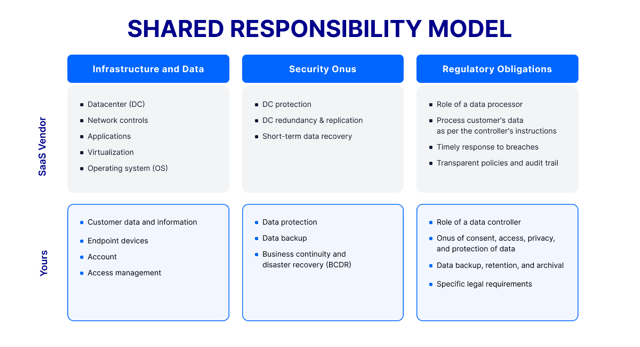
 Under the shared responsibility model, your SaaS provider secures the platform and keeps it running, but protecting and retaining your data is your responsibility.
 The leading causes of SaaS data loss are human error and accidental deletion, ransomware and malware, malicious insiders, sync and integration failures, provider outages, and data corruption.
 Native retention windows in Microsoft 365 and Google Workspace are short and easy to miss. Once the window passes, deleted data is often gone for good.
 A strong SaaS backup solution gives you fast, granular recovery, automated scheduling, immutable encrypted storage, and retention that supports GDPR and HIPAA compliance.
SaaS backup is the practice of making independent copies of the data your business creates inside cloud applications like Microsoft 365, Google Workspace and Salesforce, so you can recover that data if it is deleted, corrupted, or held for ransom.
If your team runs on cloud tools, this matters more than most people realize because a common and costly assumption is that a SaaS provider already backs everything up for you. They don’t, at least not in the way you need.
This guide explains what SaaS backup is, why the shared responsibility model leaves your data exposed, what causes SaaS data loss, how backup works, and how to choose a solution that fits your business.
What is SaaS backup?
Definition and SaaS backup meaning
SaaS backup is the process of creating and storing independent copies of the data generated inside SaaS applications like Microsoft 365, Google Workspace, and Salesforce. You may also see it called cloud-to-cloud backup, but the meaning is the same: it’s a separate, recoverable copy of your cloud-based application data that you control.
The distinction that matters most is between what a provider gives you and what a backup gives you. A SaaS provider keeps your data stored and available as part of running its service, with limited, short-term retention to guard against its own outages.
A data backup is a copy held independently of a provider with retention and recovery controls that you set. A provider's copy keeps the lights on while your independent backup is what you restore from when data is deleted, encrypted, or corrupted and the provider's retention has lapsed
Why is SaaS backup important?
SaaS applications run the core of most businesses: email, files, customer records, finance, and collaboration documents all live in cloud-based applications. That makes the data inside them business critical, and it makes the gaps in how that data is protected a direct risk to business operations. Many of those gaps trace back to a single misunderstanding about who is responsible for the data.
SaaS data is under active attack. A report from Microsoft found that over a year of incident-response engagements, 51% showed evidence of data exfiltration, where attackers actively copied data out of compromised environments. In this situation, it was determined that organizations struggled to determine access in cloud tenants across the trust chain of SaaS applications, guest accounts, and delegated privileges, which is the kind of blind spot that can turn a small incident into a large one.
“As businesses are more dependent on SaaS technologies, it becomes crucial to ensure SaaS data is both protected and recoverable, given the vulnerability of SaaS data to errors, cyberattacks, and vendor mishaps, robust backup solutions are also indispensable.”
The shared responsibility model explained
Under the shared responsibility model, a SaaS provider is responsible for the security and uptime of its platform, and you are responsible for the data you put into it. Providers protect their infrastructure against their own failures. They don’t assume responsibility for recovering data you delete, what an employee maliciously destroys, or ransomware encrypted through a compromised account.
A routine offboarding shows how easily this happens. An IT admin removes a departing employee's Microsoft 365 account, which is standard practice. Weeks later, a colleague needs a shared file and an email thread that lived in the former employee’s account, only to find both are unrecoverable because the native deletion retention window already expired. Nothing went wrong procedurally. The data simply aged out of the provider's short retention, and without an independent backup there was nothing left to restore from.
Without addressing this shared responsibility model gap, organizations can inadvertently lose data they assume was safe, only to discover they can’t retrieve it when it’s no longer possible.
What are the most common causes of SaaS data loss?
The data living in your SaaS applications faces threats from every direction at once, from outside attackers and internal human mistakes to failures in the platform. Knowing where the risks come from is what lets you protect against SaaS data loss.
Data loss is a concern for organizations that rely on SaaS applications. Even with cloud-based tools like Microsoft 365, Google Workspace, and Salesforce, data can be lost due to user mistakes, cyberattacks, software issues, or service disruptions. While SaaS providers keep their platforms running, recovering lost data is not always their responsibility. Prevention tools like Microsoft 365 data loss (DLP) reduce the risk of leaks, but they don’t recover data once it’s gone, which is where backup comes in.
The impact can be significant. IBM reports that the average cost of a data breach reached $4.88 million in 2024>, and Verizon found that a human element was involved in 68% of breaches. Together, these findings show that both technical failures and everyday mistakes can put business data at risk. Here are some of the most common data loss causes.
6 types of SaaS data loss
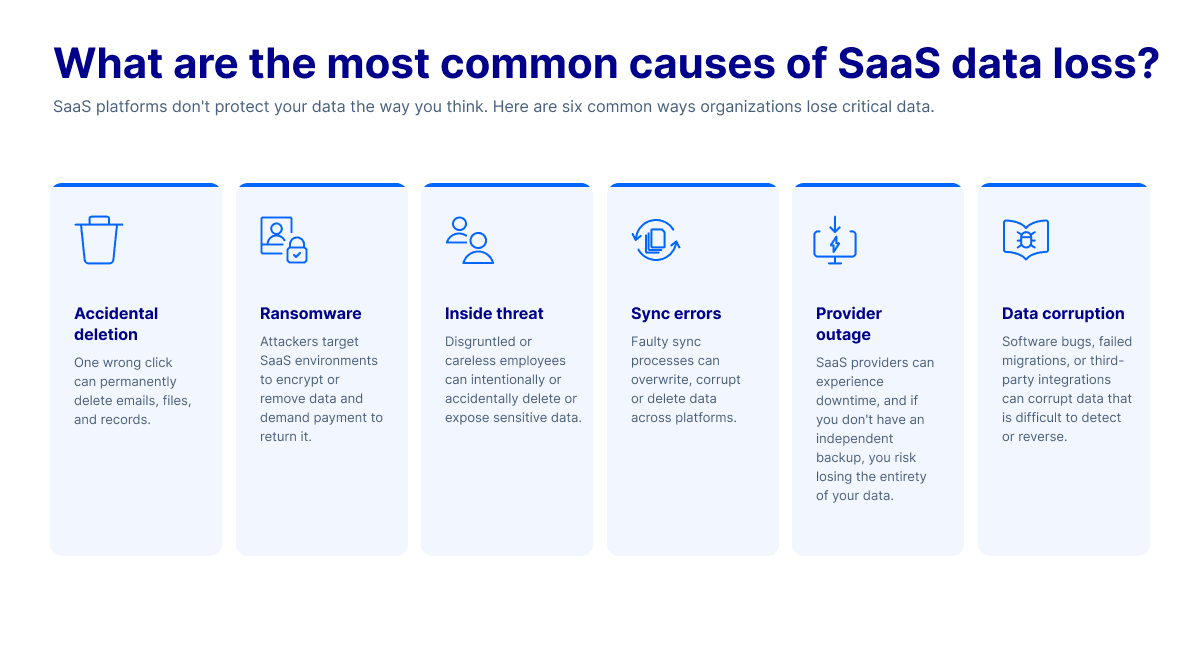
Accidental deletion
A user or administrator can accidentally, but permanently, delete a file, mailbox or record, and it ages out of native retention before anyone notices. This human error is one of the most frequent and preventable causes of permanent loss.
Ransomware attacks
Ransomware encrypts or destroys data inside your SaaS environment, often after a single compromised login.
The scale is significant: 82% of observed ransomware incidents involved large-scale data exfiltration, and more than 40% of ransomware attacks involve hybrid components.
Malicious insider threats
A disgruntled employee with legitimate access intentionally deletes or steals data. Native controls are poorly equipped to reverse these actions.
Sync errors and integration failures
A misconfigured sync or a third-party integration overwrites or corrupts data that propagates the error across every connected system.
SaaS provider outages or service termination
An outage, account suspension, or discontinued service can cut off access to your data, sometimes permanently. The problem is amplified if a provider's recovery commitments don’t align with your needs.
Data corruption
Files are corrupted through software bugs, incorrect integrations, or faulty storage, leaving data present but unusable.
What are the key benefits of SaaS backup?
Fast, granular data recovery
Strong data recovery restores exactly what was lost, down to a single file, email, or folder instead of forcing a full rollback. That precision is what keeps a deletion or attack from becoming days of downtime.
Streamlined regulatory compliance
Independent backup with controllable retention helps you meet GDPR, HIPAA, and industry-specific retention requirements that native SaaS tools were never built to satisfy.
Reduced IT burden through automation
Automated, scheduled backups remove the manual effort and human error that come with it. This lets your IT team focus on more important work while your protection system runs quietly in the background.
Continuity through any disruption
Fast recovery keeps an outage, deletion, or attack from halting your business, so operations continue while data is restored in the background rather than grinding everything to a stop.
Ransomware resilience
Immutable backups that an attacker cannot alter or delete give you a clean copy to restore. This is a powerful way for you to leverage your position with a ransom demand because you can recover all your data without making your business pay anything.
How does SaaS backup work?
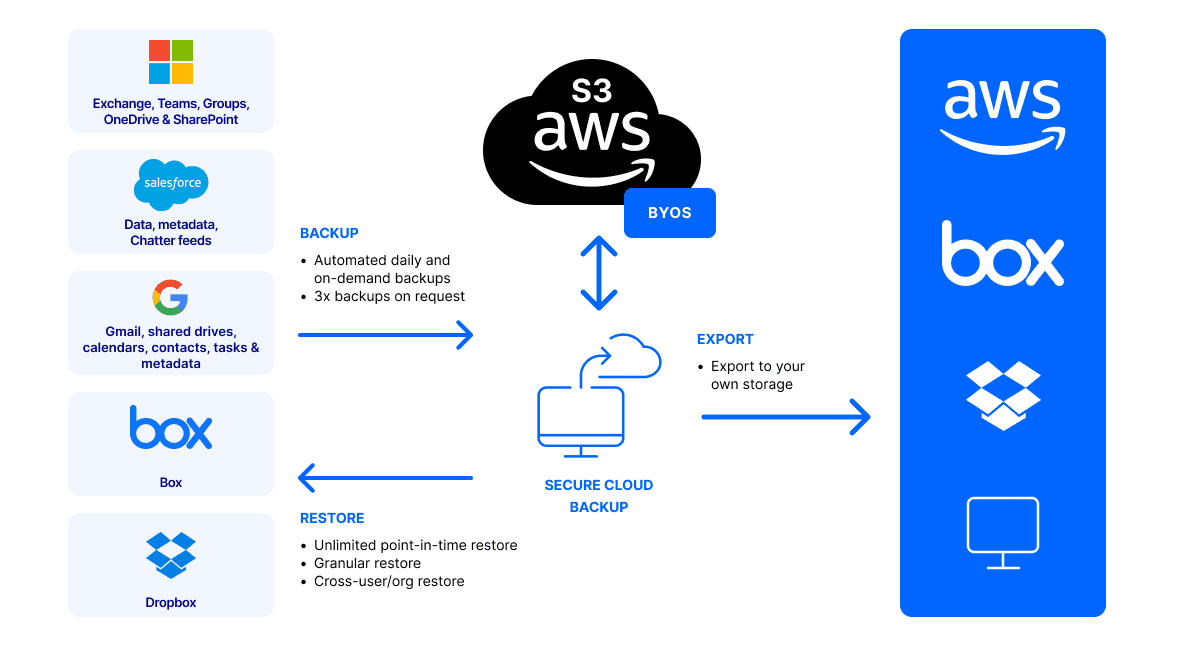
A backup service connects to your SaaS applications with their APIs. When your business is connected and granted permission, the data across your environment is read and includes the mailboxes, files, calendars, contacts, and application records like those found in Salesforce.
From there it runs on a schedule that you set to capture changes from the last run and writes new copies to storage that sit outside the SaaS provider. Each copy is a point-in-time snapshot, so the service builds a timeline of recoverable versions rather than a single overwritten copy. When you need to recover, you choose the version that exists before the data loss and restore exactly what you need, whether it’s a single deleted email or an entire account. This allows you to go back to the original location or the latest copy you created.
Good data management is what makes this backup-and-restore cycle dependable. Knowing what is protected, how far back you can go, and how quickly you can restore is the difference between a backup that simply runs and one that you can count on in an incident.
Key features of a SaaS backup solution
SaaS backup solutions vary in scope and recovery capabilities. Because of this, it’s important to focus on a set of core features that impact data protection, recovery speed, administrative effort, and compliance outcomes. Here are some things you want to consider.
- Automated and scheduled backups: Backups run daily, in near real time or on demand, without relying on anyone to manually monitor it.
- Point-in-time recovery and historical snapshots: You can restore data to a specific time before a deletion or corruption happened and use saved snapshots of your previous data.
- Granular search and restore: You have the capability to be specific and find and recover data by file, email, keyword, date, or owner, instead of restoring everything at once.
- Multi-platform support: You can save management time by consolidating into a single solution that covers Microsoft 365, Google Workspace, Salesforce, Box, and Dropbox.
- Storage flexibility: You can use vendor-managed storage or bring your own. It’s up to you and depends on your level of control and what your compliance needs are.
How to choose the right SaaS backup solution
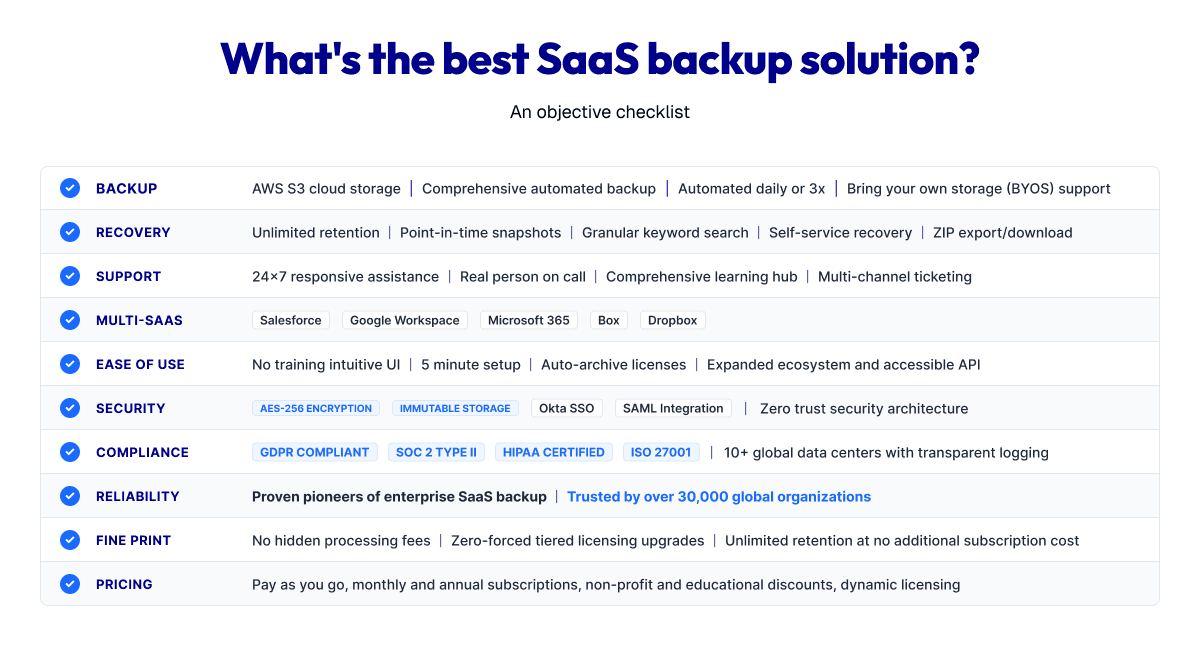
What you need to look for in a SaaS backup solution
SaaS backup solutions vary in scope and recovery capabilities. Because of this, it’s important to focus on a set of core features that impact data protection, recovery speed, administrative effort, and compliance outcomes. Here are some things you want to consider.
- Platform and application coverage: Confirm the backup solution protects every SaaS application you need and provides room to add more applications.
- Backup frequency and retention options: Look for flexible scheduling and retention that is extensive enough to meet your governance and regulatory needs.
- Security and compliance certifications: Check for ISO, GDPR, and HIPAA alignment so the solution supports instead of complicates your compliance needs.
- Encryption and immutability: Require encryption in transit and at rest. Ensure there are immutable copies that ransomware cannot alter or delete.
- Ease of setup and management: A clear interface and simple setup helps your team reduce gaps and misconfigurations.
- Scalability: Any solution you choose should fit the current structure of your organization and have the capacity to scale as the data you need to secure increases.
SaaS backup best practices
Protecting SaaS data comes down to habits applied consistently. The practices below keep your data secure and your recovery dependable.
Automate your backups
Set automated backup schedules instead of manual processes. Human error is a leading cause of missed backup windows. Automation removes that risk with a dependable cadence.
Test your recovery regularly
A backup you’ve never restored is an unproven one. Run routine recovery tests by restoring specific files or emails into a staging environment, so you can confirm the data is complete and usable before you need to depend on it when there’s an incident.
Apply the principle of least privilege (PoLP)
Limit who can access, modify, or delete backup data. Reining in who can do what reduces the risk that an insider, or an attacker using stolen credentials, can reach and destroy your data.
Ensure compliance-ready retention settings
Configure retention periods that align with GDPR, HIPAA, and internal data governance policies. Matching retention with your obligations keeps you audit ready and avoids premature deletion and any associated unnecessary costs.
Choose immutable, encrypted storage
Store backups in an encrypted, immutable format that cannot be altered or deleted by ransomware or anyone else. Immutability is what guarantees a clean copy survives even when an attacker reaches your environment.
How does OpenText stand out?
When the decision comes down to cost and capability, what matters is how fully a solution protects your data and how fast it gets that data back.
OpenText Cloudally Backup safeguards more than 30,000 organizations, from startups to Fortune 500 companies.
Our platform solves the SaaS data protection challenges organizations face:
- Protection from accidental deletion and short native retention. Run automated, immutable backups with unlimited retention, so data is recoverable long after a provider's own window closes.
- Shut down ransomware. Backups are immutable and AES 256-bit encrypted that gives you a clean copy no attacker can alter or delete.
- Fast recovery. A one-click point-in-time restore from historical snapshots lets users self-serve, and advanced granular search finds a single email or file by keyword, date, owner, or type.
- Compliance regulations. Our platform supports GDPR and HIPAA, has ISO certification, and backs a 99.99% uptime SLA. You get your choice of vendor-managed AWS storage across global data centers or your own Microsoft Azure, GCP and AWS storage.
Coverage spans SaaS platforms businesses depend on: Microsoft 365, Exchange, SharePoint, OneDrive, Teams, and Google Workspace, Salesforce, Box, and Dropbox, with metadata included.
What should I do now?
Below are three ways you can continue your journey to protect your SaaS data:
- Take the OpenText Cloudally Backup Interactive Product Tour to see how SaaS backup works for Microsoft 365, Google Workspace, and Salesforce—no commitment required.
- Get the white paper: 7 reasons every business needs SaaS backup to learn what's really at risk when you rely on your SaaS provider alone.
- Follow OpenText Cybersecurity on LinkedIn for the latest insights on data protection, ransomware defense, and cloud security.
FAQ

Brette Petersen
Brette Petersen is a Senior Product Marketing Manager at OpenText Cybersecurity, focused on messaging and positioning for ransomware prevention and detection solutions. She brings more than eight years of product marketing experience, including a tenure at Proofpoint leading email security marketing for a $700M+ SaaS platform. Brette holds an MBA in Marketing Analytics and Management from the University of Utah's David Eccles School of Business and is certified through the Product Marketing Alliance and Pragmatic Institute. She is committed to helping customers cut through complexity with clear, credible product storytelling.