What is email security?


Introduction
It’s become more apparent every day that AI has fundamentally changed what email attacks look like.
The fact that Microsoft detected approximately 8.3 billion email phishing threats in the first quarter of 2026 makes the need for robust email security standards, specialized tools and policies to prevent data breaches a focus for SMBs.
The inbox is now the primary target that attackers use to steal sensitive information. A single successful phishing attempt can disrupt operations, compromise financial assets, and expose sensitive client data.
Because of this, we’ve created this guide to show you how you can build a resilient defense.
What is email security?
Email security is a framework of technologies, policies, and protocols that work together to protect email communication. It governs how messages are sent, received, stored, and monitored. The goal is to keep sensitive information out of the wrong hands and malicious content out of inboxes.
Since email is one of the primary attack vectors for cyber threats, it’s important to understand what this framework covers.
The email security framework operates across three interconnected layers:
Technologies:
The tools that detect and block cyberattacks, like spam filters, AI-driven detection engines, sandboxing, encryption, and authentication protocols like SPF, DKIM, and DMARC.
Policies:
The organizational rules that define how email should be used, what data can be shared, and how incidents are reported and handled.
Protocols:
The technical standards that verify sender identity, secure messages in transit, and ensure email reaches its intended recipient without tampering.
Email moves client data, financial instructions, login credentials, and internal strategy through your business every day. Protecting that flow with email security is how you safeguard sensitive data from exposure, keep your email infrastructure operational, maintain business business continuity, and meet compliance obligations under frameworks like GDPR and HIPAA.
What are the key benefits of email security?
Strong email protection delivers returns across the entire organization. Here is where those returns appear most.
Breach prevention
Email security stops phishing, business email compromise (BEC), and other malicious threats before they reach users.
This significantly reduces the likelihood of ransomware infections, credential theft, and sensitive data exposure. The earlier a threat is intercepted in the delivery chain, the less damage it can do.
Reputation protection
A single business email compromise incident can result in significant financial loss and destroy client and partner trust. Think about a situation where an attacker impersonates a finance director to redirect a payment—the ramifications of this can impact a business’ bottom line and erase any credibility it has with its customers.
Authentication protocols like DMARC prevents attackers from spoofing your domain or sending fraudulent emails that appear to come from your organization, which keeps your brand and your relationships intact.
Compliance readiness
Properly configured email security like encryption and data loss prevention helps businesses meet obligations under GDPR, HIPAA, and similar frameworks. Audit trails and policy enforcement records make compliance reporting faster and defensible under scrutiny.
Productivity
Effective email security keeps the organization moving on three fronts.
First, employees spend less time assessing suspicious messages and more time on productive work. Then security teams can shift their focus from reactive incident management to proactive defense. And lastly, with fewer successful attacks disrupting systems and workflows, business operations run without interruption.
What are the most common email attacks in 2026?
Attackers use a range of techniques to exploit email as an entry point. The methods themselves are not new; phishing, spoofing, and credential theft have been core tactics for years. What has changed is how effectively AI has made them harder to detect and easier to scale.
Types of email attacks
Here are the most prevalent types of attacks organizations face today
Understanding the threats that target your inbox
Phishing
Fraudulent emails that trick recipients into clicking malicious links, surrendering credentials, or downloading malware. Modern phishing is AI-personalized and often indistinguishable from legitimate correspondence.
In Q1 2026, 78% of all email threats were link-based, making the malicious link the dominant delivery mechanism across nearly every attack type.
The damage phishing can cause:
Microsoft reported that a single campaign in March 2026 sent 1.5 million malicious messages to 179,000 organizations in one day. The attack used three separate phishing kits simultaneously. Attackers also engineered around automated defenses: CAPTCHA-gated phishing, which forces human interaction to bypass scanners, doubled in March 2026 to 11.9 million attacks.
Authentication protocols like DMARC prevents attackers from spoofing your domain or sending fraudulent emails that appear to come from your organization, which keeps your brand and your relationships intact.
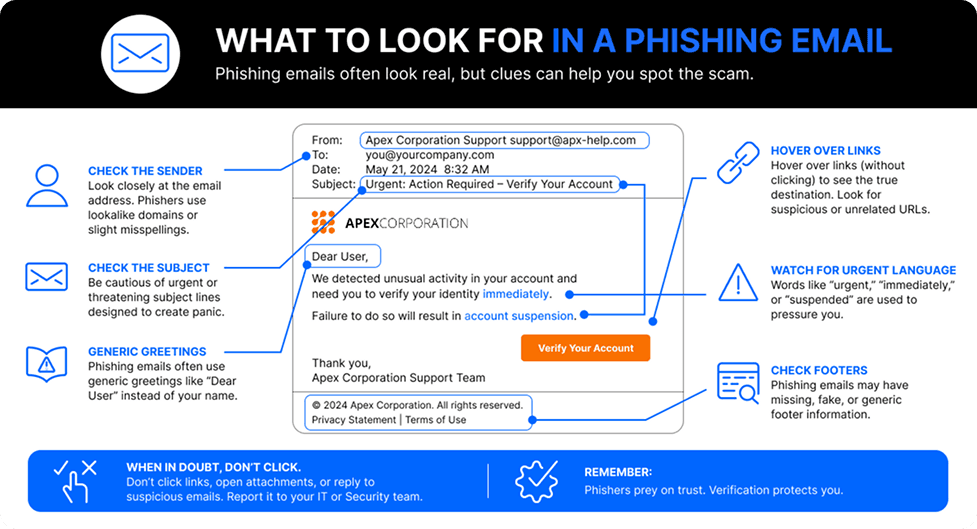
Business Email Compromise (BEC)
A targeted attack in which an attacker impersonates a trusted individual like an executive, finance director, or vendor to manipulate an employee into transferring funds, sharing sensitive data, or changing payment details.
BEC doesn’t require malware, a malicious link, or attachment. It’s seemingly harmless nature of entry into your network makes it particularly dangerous. Microsoft found that 82–84% of initial BEC emails are plain-text messages that ask something as simple as, "Are you at your desk?," which a standard filter wouldn’t flag.
Spoofing
Attackers forge sender addresses to make an email appear to originate from a trusted source: a bank, vendor, or senior colleague. Spoofing is frequently the setup for business email compromise and wire fraud.
Account takeovers
Attackers gain access to a legitimate email account using stolen or guessed credentials, then use that trusted account to send fraudulent requests internally or to external partners with no suspicious links or attachments to trigger detection.
Ransomware
Malicious software delivered via email, typically through infected attachments or links that encrypt files and hold them until a ransom is paid.
Spam
High-volume, unsolicited messages used to overwhelm inboxes, deliver malware, or funnel victims toward scam pages. Spam remains a delivery vehicle for more sophisticated threats.
Identity theft
Email-based attacks that extract personal information to impersonate an individual or access accounts across multiple platforms.
Email interception
Attackers who have gained network access intercept email traffic to read sensitive information, harvest credentials, or modify messages in transit without the sender or recipient detecting anything unusual.
How do email attacks work?
Cyberattacks sent via email have become more targeted, more convincing, and harder to spot. The mechanics behind them are worth understanding because the email security defenses that work are built around how these attacks operate.
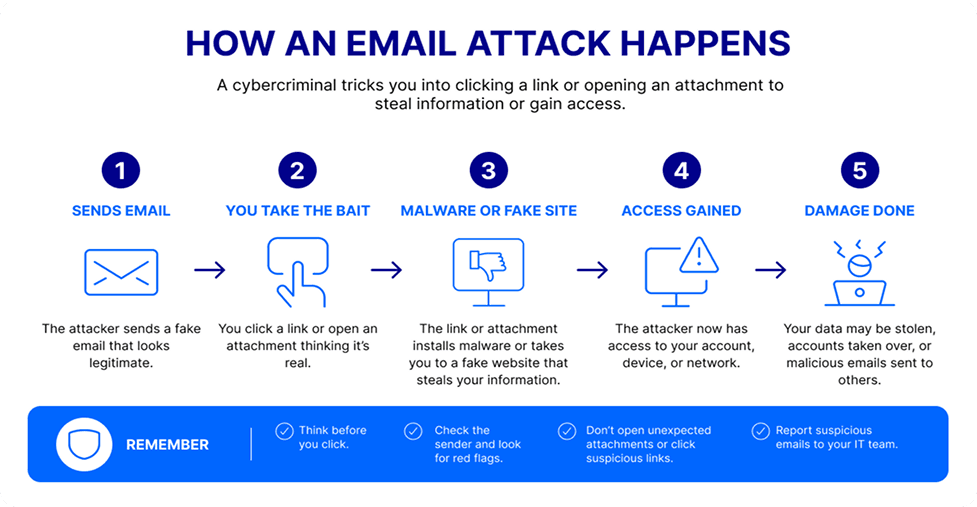
Social engineering
Most email attacks attempt to exploit people and our human nature. A well-crafted phishing email manufactures urgency, establishes apparent authority, or leverages a familiar context to move a busy person past their better judgment. The technical entry point is secondary. Getting a human to act is the objective.
AI-generated content and spear phishing
AI gives cyber criminals the ability to run social engineering at a scale and specificity that was not possible before. Criminals now analyze public data at volume to generate spear phishing messages tailored to specific roles, relationships, and professional contexts.
AI also enables polymorphic phishing, where campaigns are iterated in near real-time in an attempt to avoid detection. AI-generated phishing emails now achieve a 54% click-through rate compared to 12% for standard attempts—a 4.5x increase.
Credential theft and malicious software attacks
Stolen credentials are the other primary mechanism behind data breaches. Attackers use phishing to harvest login information and then log in rather than break in. They exploit legitimate cloud infrastructure, trusted SaaS platforms, and convincing branded pages to stay under the radar of reputation-based filters.
These methods work. Most threats reaching the inbox now prioritize credential theft over simple malware delivery, using the email as a gateway for account takeover. Once inside, attackers move laterally to exfiltrate data or launch ransomware, making the initial email just the first step in a broader attack chain.
Email security technologies and services
Traditional versus AI-enhanced email security
Legacy email security was built for a different threat environment. Static rules and known signatures worked when attacks were predictable and volume driven. Today's threats are neither. A spear phishing email crafted by AI to mimic a colleague carries no malicious link, no suspicious attachment, and no signature a legacy filter would recognize. It passes through cleanly.
AI-driven email security approaches the problem differently. Rather than matching messages against known cyber threats, machine learning models establish behavioral baselines across users, domains, and communication patterns, then identify anomalies as messages are processed.
This matters for attacks that legacy filtering often misses, like spear phishing emails without a malicious link or attachment, polished language, and sender addresses that closely resemble a trusted executive. Behavioral analysis can flag these messages when factors like sending patterns, timing, or recipient relationships deviate from historical norms, even when traditional signature-based controls detect nothing unusual.
That capability catches zero-day threats and novel attack patterns that signature-based systems miss. It also reduces false positives and keeps communication flowing without creating friction for users or security teams.
Traditional email security
AI-enhanced email security
Static, predefined rules
Machine learning analyzes patterns and intent
Only blocks threats previously seen or documented
Identifies zero-day threats and new attacks in real time
Difficulty adapting to rapidly evolving hacker tactics
Continuously evolves to improve detection accuracy
Prone to false positives and accidentally blocking legitimate emails
Reduces false positives for uninterrupted communication
What core email security services can you use to protect your organization?
A well-designed email security solution draws on several complementary technologies working in concert.
Spam filtering analyzes sender reputation, message content, and behavioral signals to block high-volume, lower-sophistication threats before they reach inboxes.
Email encryption ensures that message content remains unreadable to anyone outside the intended exchange. It is particularly relevant for organizations that transmit customer data, financial records, or protected health information by email.
Authentication protocols: SPF, DKIM, and DMARC work together to verify that incoming emails genuinely originate from the domains they claim to represent. SPF specifies authorized sending servers. DKIM applies a cryptographic signature. DMARC instructs receiving servers on what to do when a message fails authentication. Together, they close the door on spoofing and domain impersonation.
While SPF, DKIM, and DMARC are often discussed together, they address different failure modes.
Sandboxing and detonation open suspicious attachments and links inside isolated virtual environments to test and analyze them before delivery. If a file tries to make network connections, or a link redirects to a credential-harvesting page, the sandbox catches it―this is the layer where threats that look clean on the surface tend to give themselves away.
Content inspection and data loss prevention (DLP) scans outbound messages for financial records, personal information, and proprietary content, and prevents that data from leaving the organization without authorization.
Image controls analyze embedded visuals for hidden payloads and close a gap that is easy to overlook and increasingly exploited.
What can your business do to prevent email attacks?
 The right technologies create the foundation. But email security ultimately depends on how people use, maintain, and respond to it. These five practices put that foundation to work:
1. Multifactor authentication (MFA)
MFA adds a second layer of verification that protects accounts even when credentials have been stolen through phishing. A password alone is no longer a meaningful barrier. Phishing-resistant MFA, implemented through passkeys or hardware security keys, blocks more than 99% of unauthorized identity-based access attempts. For privileged and administrative accounts, it is the single highest-return security control available.
2. Zero-trust encrypted emails
The Zero Trust model treats every email and every user as untrusted by default. Access is continuously verified, rather than assumed. Applied to email, this means messages are encrypted end-to-end, senders are authenticated at each step, and access to sensitive communications requires active verification rather than inherited trust.
3. Continuous security testing
Security configurations that go untested create opportunities for attackers. Threat methods evolve and what a filter caught reliably last quarter may not catch today's variant. Regular phishing simulations test whether employees recognize current attack patterns.
4. Internal monitoring and audits
Email security audits surface configuration weaknesses before attackers find them. Real-time monitoring flags anomalous sending behavior, unusual login locations, and other signals that suggest an account has been compromised. The organizations that catch incidents early are those that treat security as a continuous operating discipline rather than a periodic project.
5. Cybersecurity training for internal teams
Automated systems intercept a great deal of malicious content. They do not intercept everything, and the most sophisticated spear phishing campaigns are specifically engineered to clear both technical filters and human judgment. Continuous staff training closes that gap. Effective programs use attack examples from current threat data, run simulated phishing campaigns with immediate corrective feedback, and deliver role-specific guidance for employees who manage financial transactions, sensitive data, or executive communications. Security awareness is a skill that diminishes without regular reinforcement.
6. Enable fast and easy reporting for internal teams
The best threat intelligence a business has is often sitting with its employees. When reporting a suspicious email is simple and fast, people do it. When security teams act on those reports visibly and promptly, reporting rates climb and response times drop. Over time, that feedback loop turns the workforce into an active layer of defense.
What is the future of email security and email protection?
Email threats will continue to grow in volume, sophistication, and personalization. The organizations that stay ahead will be those that invest in adaptive, AI-powered defenses before the gap between attacker capability and their current stack gets any wider.
Advancements in AI and automation
AI is the defining factor on both sides of the threat equation right now. Attackers use it to generate personalized content, automate reconnaissance, and iterate campaigns in real time to evade detection. That capability is already operational.
In 2025, Anthropic reported that threat actors attempted to use its Claude AI system to assist with phishing email creation and the development of malicious code—a clear sign that adversaries are working with generative AI to scale social engineering.
At the same time, defenders are using AI to establish behavioral baselines, surface zero-day threats, and run automated response workflows that would otherwise consume hours or days of analyst time.
The emerging phase is agentic AI: autonomous security systems that monitor, detect, and respond to email threats without waiting for human intervention. Behavioral analytics will grow more granular with the ability to flag malicious attachments and suspicious communication patterns, unusual timing, and subtle shifts in writing style that indicate an account has been compromised or impersonated.
For organizations thinking about their security roadmap, the question is how quickly they can invest in AI-powered email security before the delta between what attackers can do and what current defenses can catch becomes a breach.
Start your email security journey with OpenText Cybersecurity
OpenText Cybersecurity's email security portfolio is built to help businesses protect themselves proactively rather than reactively.
We harness AI-powered threat detection that uses Machine Learning (ML) to catch phishing and fraud attempts beyond static usage. Combined with end-to-end encryption, authentication enforcement, and compliance reporting, this ensures that every layer of protection is available in a single, scalable solution.
When you need to secure your business to manage email risk, OpenText gives your team the tools they need to stay ahead of threats without adding any friction to how your business communicates.
FAQ
Email security gives small businesses and individuals control over one of their most exposed assets. For SMBs, it protects sensitive data, financial transactions, and business reputation from attacks that can be disproportionately damaging on a smaller scale. For individuals, it keeps personal information and login credentials out of the wrong hands.
Spam filters catch known, high-volume threats based on static rules and sender reputation. Professional email security goes further, applying behavioral analytics, sandboxing, AI-driven detection, and authentication protocols to catch targeted attacks, business email compromise, and zero-day threats that carry no signatures a spam filter would recognize. Personalized spear phishing and account takeover attempts are where that difference matters most.
Common signals of email compromise include login alerts from unfamiliar locations or devices, messages in your sent folder you did not send, unexpected password reset requests, contacts reporting strange messages from your address, and changes to email forwarding rules you did not make. If any of these do appear, change your password immediately, revoke active sessions, enable MFA if it’s not already active, and alert your IT or security team.
Watch for urgency tactics like “Act now or your account will be closed,” mismatched sender domains, requests for credentials or payment over email, and links redirecting to unexpected domains.
For AI-generated phishing, ask: Does it pressure you to act before you can verify? Does it bypass a normal approval step, like wiring money or sharing credentials? Did it arrive with no prior context?
If you answer yes to any of these questions, verify before you act.
No. Email encryption is one component of the email security strategy. Encryption ensures that message content is unreadable to anyone outside the intended exchange.
In addition to email encryption, full email security also includes threat detection, spam filtering, authentication protocols, sandboxing, access controls, and data loss prevention.

Andrew Murphy
Andrew Murphy is Senior Director of Product Marketing at OpenText Cybersecurity, focused on portfolio strategy and competitive intelligence across 18+ cybersecurity products. He turns complex, acquisition-built product lines into a single platform message that SMBs and MSPs can act on, grounded in market and competitive data. With nearly 20 years of experience, including a long tenure at Zix prior to its acquisition, Andrew holds a Bachelor's degree in Telecommunications from Indiana University Bloomington. He is focused on messaging that helps sales teams sell, not just sound clever.