How to choose a SaaS backup solution - A complete guide




Key takeaways
 A SaaS backup solution creates independent, recoverable copies of your SaaS data, stored separately from what the provider keeps.
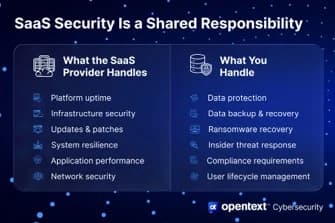
 Under the shared responsibility model, your SaaS provider secures the platform while protecting and recovering your data is your responsibility.
 Native retention windows inside apps like Microsoft 365 typically run 30 to 93 days, and once that window closes, deleted data is usually gone for good.
 Strong SaaS backup solutions cover platform breadth, backup frequency, restore speed and granularity, security, compliance, ease of setup, transparent pricing, and data portability.
 RTO measures how fast a vendor restores your data, and RPO measures how much data you could lose between backups, so both should be spelled out in the vendor's SLA.
 For SMBs and enterprises protecting Microsoft 365, Google Workspace, and Salesforce, OpenText Cloudally offers automated daily backups, unlimited point-in-time restore, and pay-as-you-go pricing with no hidden fees.
Why your SaaS provider isn't enough, and what you need
Microsoft, Google, and Salesforce keep their platforms patched and accessible, but their responsibility ends at infrastructure security. Once your data enters the application, protecting, retaining, and recovering it after an incident falls entirely on your team. This shared responsibility framework leaves an operational blind spot that frequently catches companies unprepared.
This gap becomes obvious when dealing with native retention policies. Most SaaS platforms hold deleted files for thirty to ninety days, after which the data permanently disappears. Imagine an administrator offboarding a departing employee and deleting their user account. Months later, a department head asks for a critical file from that former worker’s cloud storage, only to find the retention period expired, and the record vanished.
The risk extends far beyond simple user error or mistaken deletions. OpenText Cybersecurity research reveals that while 95% of organizations feel confident in their ability to bounce back from ransomware, only 15% of managed to recover all of their data.¹ Relying strictly on native platform controls creates a false sense of security, making dedicated, third-party backup solutions essential for true operational resilience.
Key criteria for choosing a SaaS backup solution
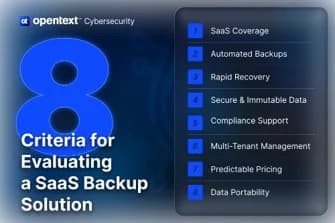
Signing a contract with the wrong vendor is expensive to undo, so treat this like a checklist rather than a gut call. The eight criteria below cover what separates a dependable SaaS backup solution from one that looks good in a sales deck but falls short during a real recovery.
1. Platform and application coverage
Confirm the vendor protects every SaaS application your business runs on, including the ones outside your core productivity suite. A solution that covers Microsoft 365 but skips Salesforce or Google Workspace leaves you exposed the moment data moves outside its reach. Check coverage at the data level too, since some tools protect email but skip files, chat history, or metadata.
2. Backup frequency and retention
Ask how often backups run and whether you can trigger one on demand before a risky change, such as a migration or a bulk permission update. Then ask how long backups are retained. Compliance-heavy industries often require data retention lasting several years, far exceeding the standard 30 to 90-day window offered by native tools.
3. Restore flexibility and speed (RTO and RPO)
Recovery time objective (RTO) tells you how fast a vendor can restore your data after an incident. Recovery point objective (RPO) tells you how much data you stand to lose in the gap between backups. Both numbers should be spelled out in the vendor's SLA, and both should match how much downtime and data loss your business can tolerate.
4. Security and immutability
Data at rest and in transit needs strong encryption, and backup copies need immutable storage so ransomware cannot encrypt or delete them along with your live data. Confirm that immutability applies to every backup copy rather than a premium tier you have to pay extra to unlock.
5. Compliance and reporting
Look for vendor certifications such as ISO 27001, HIPAA, SOC 2, or GDPR alignment that validate strong security and privacy standards. Clear reporting matters just as much as the credentials themselves, as auditors require verifiable documentation they can review.
6. Ease of setup and management
Prioritize solutions that offer automatic discovery for new users and sites, a single monitoring dashboard across every protected application, and streamlined onboarding. Minimizing management overhead ensures reliable protection without burdening your IT team with constant administrative maintenance.
7. Pricing model and total cost of ownership
A vendor’s pricing might look simple until storage overages, premium retention tiers, or support fees show up on the invoice. Ask for a full breakdown of what triggers additional charges before you sign anything and get clarity on how costs scale as your user count or data volume grows.
8. Data portability and vendor independence
Ask what happens to your backed-up data if you switch vendors or lose access to your tenant. A solution that supports full export, such as PST files, gives you a way out without holding your data hostage.
To build a more resilient cloud strategy around these criteria, read our full guide on the 7 reasons every business needs SaaS backup.
Questions to ask SaaS backup vendors before you buy
Before signing a contract, you need clear answers about how a backup vendor protects your data, handles security threats, and manages costs at scale. Asking the right technical and operational questions up front prevents costly gaps in protection and ensures the solution aligns with your recovery requirements.
- Which SaaS applications do you support, and does coverage include metadata?
- What is your immutable storage policy, and can ransomware affect backup copies?
- What is your immutable storage policy, and can ransomware affect my backup copies?
- What are your RTO and RPO guarantees, and are they written into your SLA?
- How granular is the restore? Can I recover a single email or file without a full rebuild?
- Are new users and sites discovered and added to backup automatically?
- What compliance certifications do you hold, such as ISO 27001, SOC 2, HIPAA, or GDPR?
- What does pricing look like at scale, and are there hidden storage or per-service fees?
- What happens to a user's backed-up data when their account is deleted or offboarded?
- Can I export backup data in standard formats, such as PST, independent of the original tenant?
Common mistakes when choosing a SaaS backup solution
Even organizations that run a thorough evaluation can trip on a handful of recurring mistakes. Watching for these ahead of time saves a costly correction later.
- Choosing on price alone
The cheapest option often caps retention or limits restore granularity, and the true cost only shows up when a recovery attempt fails. - Overlooking restore capabilities
Backup frequency means little if recovery is slow, incomplete, or requires heavy IT involvement. Run a restore test before you commit to a vendor. - Leaving gaps in SaaS coverage
A solution that protects Microsoft 365 while leaving Salesforce or Google Workspace uncovered leaves blind spots in your data. Map your full SaaS stack before you start evaluating vendors. - Forgetting offboarded users
Some vendors keep billing for deleted users until you manually remove them, and some purge that user's data the moment the account closes. Confirm the offboarding policy in writing, especially if your team has high turnover. - Skipping a restore test before signing
A staging environment restore test tells you more about a vendor's real capabilities than any spec sheet. Backup frequency means nothing if the restore process breaks when you need it most. - Assuming compliance without proof
Ask for documentation rather than a verbal assurance that a vendor is GDPR or HIPAA compliant. A missing certificate during an audit becomes your problem to answer for, even when the gap started with the vendor.
What makes a strong SaaS backup solution, and how OpenText Cloudally delivers
The criteria above sets the bar for what a serious SaaS backup solution should offer. OpenText Cloudally was built around that same bar, covering the platforms businesses rely on most with the automation, security, and portability this buying process calls for, without adding another complicated tool to an already full IT workload.
Cloudally protects Microsoft 365, Google Workspace, Salesforce, Box, and Dropbox from one dashboard, so IT teams get a single view instead of switching between vendor consoles. Backups run automatically every day, with on-demand backup available before a risky change, and unlimited point-in-time restore means you can roll back to any moment in your data's history rather than the most recent snapshot alone. Data stays protected with AES-256 encryption and immutable storage, backed by ISO 27001, HIPAA, and GDPR compliance, so the documentation an auditor asks for is already in place.
Setup takes about five minutes and requires no training, which matters for lean IT teams that cannot spend a week configuring a new tool. Pricing runs pay-as-you-go with no hidden fees, and organizations with specific data residency needs can bring their own storage (BYOS) instead of accepting a fixed location. More than 30,000 organizations across 10-plus global data centers already rely on OpenText Cloudally SaaS backup to keep their SaaS data recoverable.
How Cloudally answers it
What should I do next?
Choosing the right data protection strategy depends on where you are in your evaluation process. Whether you want to test-drive features, explore additional research, or stay informed on emerging security threats, these resources can help guide your next step:
Try the interactive product tour — see how SaaS backup works for Microsoft 365, Google Workspace, and Salesforce, no commitment required.
Download 7 reasons every business needs SaaS backup for a deeper look at managing cloud risks and building a resilient recovery strategy.
FAQs

Brette Petersen
Brette Petersen is a Senior Product Marketing Manager at OpenText Cybersecurity, focused on messaging and positioning for ransomware prevention and detection solutions. She brings more than eight years of product marketing experience, including a tenure at Proofpoint leading email security marketing for a $700M+ SaaS platform. Brette holds an MBA in Marketing Analytics and Management from the University of Utah's David Eccles School of Business and is certified through the Product Marketing Alliance and Pragmatic Institute. She is committed to helping customers cut through complexity with clear, credible product storytelling.