Best cloud backup solutions and services in 2026



What is cloud backup, and why cloud storage isn't enough
Cloud backup creates a separate, versioned copy of your data and stores it offsite. If a user deletes a mailbox, ransomware encrypts a server, or a disk fails, you can restore the data from a point-in-time copy taken before the incident. With the right backup protections, that recovery copy remains available even when the live environment is compromised.
Cloud storage and sync tools work differently. Services such as Google Drive, OneDrive, and Dropbox sync files across devices, so a deletion or corruption can propagate to other synced copies. Cloud storage makes files available, while cloud backup keeps them recoverable after something goes wrong. The two serve different purposes, and businesses may need both.
Three common causes of data loss are human error, such as accidental deletion, ransomware and malware, and hardware or provider failure. The OpenText Cybersecurity 2025 Global Ransomware Survey of 1,773 security and business leaders shows why recovery planning matters: 95% of respondents said they were confident they could recover from a ransomware attack, yet only 15% of those who were attacked fully recovered their data. Tested, recoverable backups are an important part of closing that gap.

Key takeaways
 Cloud backup keeps a separate, versioned copy of your data offsite, giving you a clean recovery point after deletion, corruption, or ransomware.
 The 3-2-1 backup rule still matters in 2026. Keeping an offsite, immutable copy helps ensure you have a recoverable version when local copies fail or are encrypted.
 Cloud backup protects against ransomware, accidental deletion, hardware failure, and other data loss scenarios.
 Strong cloud backup solutions automate backups, support granular restores, encrypt data in transit and at rest, and help meet compliance requirements such as GDPR and HIPAA.
 For businesses protecting Microsoft 365, Google Workspace, or Salesforce data, OpenText Cloudally provides automated and on-demand backups with unlimited retention and recovery options.
Do SaaS apps like Microsoft 365 and Salesforce back up your data?
Not in the way most businesses assume. Platforms such as Microsoft 365, Google Workspace, Salesforce, Box, and Dropbox work on a shared responsibility model: the provider keeps the service running, while you're responsible for protecting the data inside it.
Native features such as recycle bins and retention policies help with short-term recovery, but deleted items are eventually purged, and an accidental or malicious change can overwrite good data. A separate SaaS backup keeps point-in-time copies outside the platform, so you can restore data even after the native options have run out.
What to look for in a cloud backup solution
The right cloud backup solution should fit the data you need to protect, give you reliable recovery options, and provide enough security and retention to withstand a serious incident. That means looking beyond basic backup functionality to see how each service handles other important aspects like coverage and frequency.
To compare the options consistently, evaluate each one against the six criteria below.
- Backup scope and platform coverage
Check which data sources the tool protects, including devices, SaaS apps, servers, and cloud environments.
- Backup frequency and retention
Look for automated scheduling with at least daily backups, plus configurable or unlimited retention.
- Restore granularity
Confirm you can recover an individual email, file, or folder without restoring an entire mailbox or system.
- Security
Look for AES-256 encryption in transit and at rest, immutable storage, and multi-factor authentication.
- Compliance support
Consider support for GDPR, HIPAA, SOC 2, and CCPA, particularly if you operate in a regulated industry.
- Pricing model
Compare per-user, per-device, and pay-as-you-go pricing, and check whether storage or other fees are charged separately.
For more on the risks businesses face when SaaS data is left unprotected, see our whitepaper, "7 reasons every business needs SaaS backup.”
The 10 best cloud backup solutions in 2026
The cloud backup market includes everything from services designed for individual devices to platforms built to protect SaaS applications and enterprise environments. We selected the 10 tools below based on their presence in review platforms and evaluated each against the six criteria above.
OpenText Cloudally is our own product, which is why it appears first. The other nine follow in no particular order, and every entry lists its limitations, including ours, so you can compare them on equal terms.
#1. OpenText Cloudally
OpenText Cloudally SaaS backup protects Microsoft 365, Google Workspace, Salesforce, Box, and Dropbox with cloud-to-cloud backups. More than 30,000 organizations use it, and administrators complete setup in about five minutes with no training.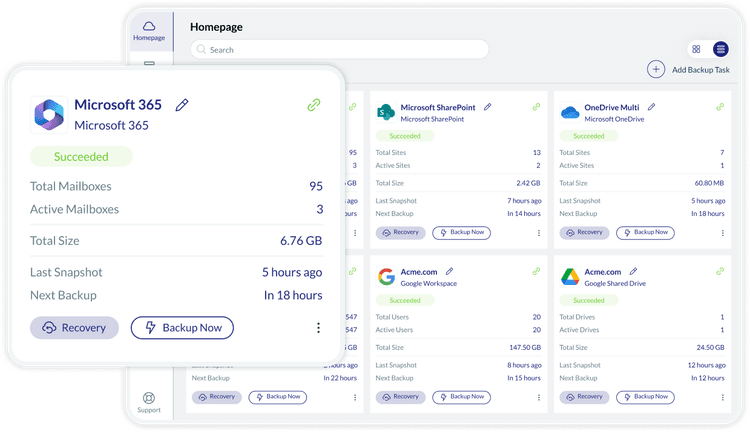
Key features and limitations
- Automated (three per day or a frequency you choose) and on-demand immutable backups with unlimited retention
- Unlimited point-in-time restore with one-click recovery and full-text search across backed-up email and files
- Unlimited AWS S3 storage in a choice of global data centers, or your own Azure, GCP, or AWS-compatible storage
- AES 256-bit encryption, MFA support, and GDPR and HIPAA compliance support
Best for: SMBs and enterprises that need to protect SaaS data with little administrative effort.
Pricing and trial: Monthly or annual subscriptions, priced per user or by data volume see pricing. A free trial and a demo are available, and the trial needs no credit card.
#2. Rubrik
Rubrik is a cyber resilience platform that combines backup, threat detection, and recovery. It protects on-premises, cloud, and SaaS data under a zero trust model, and policy-driven automation reduces manual work at scale. Security and IT teams use the same platform, which keeps recovery decisions aligned during an incident instead of split across separate tools.
Key features and limitations
- Air-gapped, immutable backups
- Threat analytics and infected snapshot isolation to locate clean recovery points
- Coverage for AWS, Azure, Google Cloud, VMware, Microsoft 365, Google Workspace, and Salesforce
- Multi-site recovery orchestration and compliance reporting
- Pricing can scale quickly with data growth, and some reviewers say the consumption-based model gets expensive for smaller environments.
Best for: Enterprises that need backup, ransomware response, and recovery in one platform.
Pricing and trial: Quote-based pricing. A guided demo is available.
#3. IDrive
IDrive backs up PCs, Macs, Linux machines, servers, mobile devices, and NAS drives under one account. Business plans include unlimited users, which suits small companies with many devices and modest data volumes.
Key features and limitations
- Disk image backup for full-system restore
- Snapshots and file versioning, with up to 30 versions per file
- AES 256-bit encryption and two-factor authentication
- IDrive Express, which ships a physical drive for large initial backups
- Some users report slow upload speeds, especially on mobile, and unexpected overage charges when storage limits are exceeded
Best for: Small and midsize businesses that manage many devices on a single plan.
Pricing and trial: Business plans start at $59.99 per month for 1.25 TB.
#4. Backblaze
Backblaze provides unlimited computer backup at a flat rate per computer. Backblaze B2 Cloud Storage adds S3-compatible object storage for developers and IT teams.
Key features and limitations
- Continuous, automatic backup with no limits on file type or size
- Business accounts with centralized administration and multi-user management
- 30-day version history, with optional forever retention
- Free mailed hard drive restores for large datasets
Best for: Individuals and small businesses that want predictable pricing.
Pricing and trial: A free trial is available. Computer backup costs $99 per year per computer, and B2 storage starts at $6.95 per TB per month.
#5. Acronis Cyber Protect
Acronis Cyber Protect combines backup and endpoint security in one platform. It protects workstations, servers, virtual machines, Microsoft 365, and Google Workspace, and managed service providers can deliver it through Acronis Cyber Protect Cloud.
Key features and limitations
- AI-based behavioral detection that stops malware, ransomware, and zero-day attacks
- Full disk image and file-level backup
- Ransomware protection with automatic rollback of affected files
- Microsoft 365 and Google Workspace backup
- The management console can run slow with large environments, and some users report inconsistent support response times
Best for: Businesses that want backup and endpoint security from a single vendor.
Pricing and trial: Per-workload licensing. A 30-day free trial is available with no credit card.
#6. CrashPlan
CrashPlan focuses on endpoint backup for business continuity. It backs up Windows, Mac, and Linux computers continuously, and deployment stays simple for distributed teams.
Key features and limitations
- Unlimited storage per user and unlimited version history
- Continuous, real-time backup
- Immutable backup for ransomware recovery
- End-user self-service restore
- Some users report slow backups and occasional restore failures, including files that would not extract cleanly
Best for: Remote and distributed teams.
Pricing and trial: A 14-day free trial is available. The Professional plan costs $7.33 per user per month when billed annually.
#7. NordLocker
NordLocker is an encrypted cloud vault from Nord Security, the company behind NordVPN. It uses zero-knowledge encryption, so only your team holds the keys. Its focus is encrypted file storage and sync, which suits focused sets of sensitive files better than full-system backup.
Key features and limitations
- Zero-knowledge, client-side encryption with AES-256 and XChaCha20
- Encrypted cloud storage with access from desktop and mobile devices
- Team sharing with access controls on business plans
- Two-factor authentication
- Some users report failed bulk uploads and lost access to files after password or product changes
Best for: Security-focused teams that store and share sensitive files.
Pricing and trial: A free 3 GB plan is available. Paid plans add 500 GB and 2 TB tiers, and business plans serve teams.
#8. Veeam
Veeam supplies enterprise data protection for hybrid and multi-cloud environments. Veeam Data Platform covers VMware, Hyper-V, AWS, Azure, and Google Cloud, and Veeam Data Cloud protects Microsoft 365 as a managed service.
Key features and limitations
- Immutable backup storage
- Instant VM and file recovery
- Built-in threat detection and ransomware protection
- Microsoft 365 backup for Exchange, SharePoint, OneDrive, Teams, and Entra ID
- Some users describe pricing as high for smaller organization
Best for: Mid-size to large IT teams that run hybrid environments.
Pricing and trial: Data Platform licensing starts at $250 per workload per year. Data Cloud for Microsoft 365 runs about $2.63 to $3.50 per user per month. A free Community Edition covers up to 10 workloads.
#9. Commvault
Commvault is an enterprise data protection platform that covers cloud, on-premises, and SaaS workloads. AI-enabled threat detection, air-gapped backups, and cleanroom recovery support ransomware response, and eDiscovery tools support compliance work. Large organizations with many workload types often standardize on Commvault instead of running separate tools for each one.
Key features and limitations
- Air-gapped, immutable backups
- Threat scanning and clean recovery point validation
- Coverage for Microsoft 365, Salesforce, Dynamics 365, virtual machines, Kubernetes, and databases
- Compliance and eDiscovery support
- Initial setup is complex, and new administrators often need significant training before they're comfortable with the console
Best for: Enterprises with complex compliance requirements.
Pricing and trial: Microsoft 365 backup starts at $1.70 per user per month, with 5 GB of storage per user. A free trial covers Microsoft 365 backup, and demos cover the full platform.
#10. Cohesity DataProtect
Cohesity DataProtect consolidates backup and recovery for virtual machines, NAS, databases, SaaS apps, and cloud workloads on one platform. Immutable snapshots and Zero Trust access controls protect backup data from tampering, and instant mass restore speeds recovery at scale.
Key features and limitations
- Immutable snapshots with DataLock policies
- Hash-based threat scanning of backup data
- Role-based access control, MFA, and SSO
- Deployment as software, as a cloud service, or through a service provider
- Doesn’t automatically remove disabled Microsoft 365 accounts from backup protection, which can require manual cleanup
Best for: Enterprises that want to consolidate several backup tools.
Pricing and trial: Capacity-based subscription pricing by quote. A demo is available.
Cloud backup solutions compared at-a-glance
| IDrive | Many devices on one plan | PCs, Macs, Linux, servers, NAS, mobile | Scheduled and continuous | Free 10 GB plan | Business from $59.99/month (1.25 TB) |
| Backblaze | Individuals and budget-conscious SMBs | Windows, Mac, B2 object storage | Continuous | Free trial | $99/year per computer; B2 from $6.95/TB/month |
| Acronis Cyber Protect | Backup plus endpoint security | Devices, servers, VMs, Microsoft 365, Google Workspace | Scheduled and continuous | 30-day free trial | Per-workload licensing |
| CrashPlan | Remote and distributed teams | Windows, Mac, Linux | Continuous | 14-day free trial | $7.33/user/month billed annually |
| NordLocker | Encrypted storage for security-focused teams | Desktop and mobile apps | On-demand and sync | Free 3 GB plan | Paid tiers; business plans available |
| Veeam | Hybrid IT teams | AWS, Azure, Google Cloud, VMware, Hyper-V, Microsoft 365 | Scheduled and policy-based | Free Community Edition | From $250/workload/year |
| Commvault | Enterprises with complex compliance needs | Cloud, on-premises, SaaS | Policy-based | Free trial (Microsoft 365); demos | Microsoft 365 from $1.70/user/month |
| Cohesity DataProtect | Enterprise data management at scale | VMs, NAS, databases, cloud apps, SaaS | Policy-based | Demo | Capacity-based quote |
How to choose the right cloud backup solution
Finding the right cloud backup solution comes down to understanding what your business needs to protect and what recovery needs to look like when something goes wrong.
The following considerations can help you narrow the list to the solutions that fit your environment.
Match coverage to your data sources
Decide whether you need to protect devices, SaaS apps, or both. A tool built for laptops will not restore a Salesforce org.
Set your RTO and RPO
Your recovery time objective (RTO) is how quickly you need to be back online. Your recovery point objective (RPO) is how much data loss you can tolerate. Shorter targets call for more frequent backups and faster restore options.
Check your compliance environment
HIPAA, GDPR, and SOC 2 requirements can narrow the field quickly, so confirm data residency and audit support before you commit to a vendor.
Test a restore
Run a trial restore during your evaluation period, not after an incident. A backup only earns its value when you need to recover, and an untested restore leaves too much to chance.
The right choice comes down to matching the solution to your data, recovery requirements, and operational needs.
What should I do next?
Explore OpenText Cloudally Take the interactive product tour, review platform coverage, and request pricing.
Download the whitepaper "7 reasons every business needs SaaS backup" covers the risks that SaaS data faces every day.
Get in touch Not sure which solution fits your setup? Talk to our team.